BEST KEYBOARDS FOR TYPING
We build typing tools. We type all day. These are the keyboards we actually recommend — from $30 to $200, with honest takes on each.
By Soexya Khatiwada · Updated September 2026
No fluff. No "top 50" lists. Fifteen keyboards across six use cases — every budget and typing style.
Skip the intro — show me the keyboard picks ↓As an Amazon Associate we earn from qualifying purchases
Back to School 2026
Off to college or shopping for a dorm setup? See our keyboards for students under $80 →
Today's Amazon Picks →
Prices and stock update continuously on Amazon. Tap any product below to jump straight to today's live Amazon page.
As an Amazon Associate we earn from qualifying purchases.
Don't want to read? Buy this.
Keychron K2 — ~$80
The default answer for 90% of typists. Wireless, 75% layout, hot-swappable, Mac + PC. If you want a single keyboard that just works — this is it.
Often cheaper direct from Keychron
Or scroll for budget / premium picks below.
Want the full breakdown?
Read our full Keychron K2 review →
Full switch guide, layout deep dive, honest research-based verdict, and the K2 SwitchPicker to help you pick Brown / Red / Blue.
First — find out your current speed
Knowing your baseline helps you pick the right keyboard for where you are now
Click here and type the words to check your speed
Two wireless boards worth a look — a budget combo and a feature-packed mechanical
Whalices 52
~$35A full wireless keyboard and mouse for the price of one budget board. Low-noise keys, rechargeable, stable 2.4G — the cheapest way to a clean wireless desk.
Best for: Home office, students, replacing a basic membrane setup
CHECK PRICE ON AMAZON→FEATURE-PACKED MECHANICALMechLands AJAZZ AK820V2
~$130-15075% mechanical with a display screen, control knob and a 10000mAh battery. Hot-swappable, gasket-mounted, with BT + USB-C + 2.4G wireless.
Best for: Gaming plus typing, enthusiasts who want every modern feature
CHECK PRICE ON AMAZON→As an Amazon Associate we earn from qualifying purchases.
Why we recommend the K2
A keyboard can't press keys for you — but consistent tactile feedback helps your fingers learn exactly how much pressure each keystroke needs, which is where accuracy (and then speed) comes from. That mechanism is why the K2 keeps topping owner recommendations for typists: light tactile switches, a standard layout your muscle memory already knows, and hot-swap sockets so you can tune the feel without buying a new board.
Based on published specs and long-term owner feedback — see our full research notes in the K2 review. Your results will vary by typist.
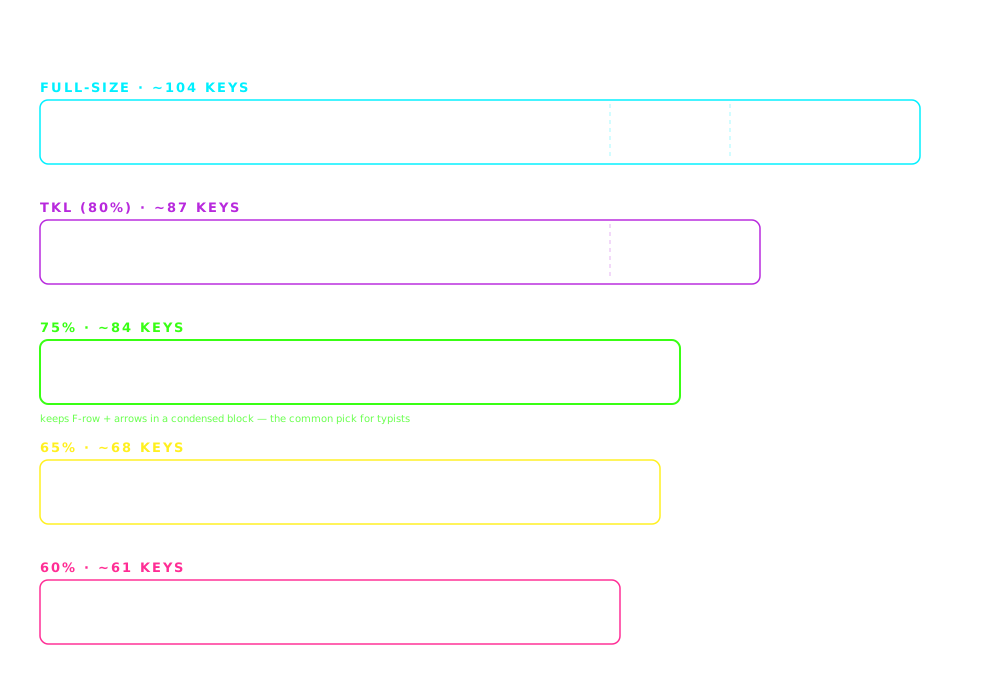
QUICK PICK GUIDE
WHAT MAKES A KEYBOARD GOOD FOR TYPING
Five checks, each with a number, before you look at a single product
Actuation point and force
A mechanical key registers about 2 mm into a 4 mm press; a rubber dome registers only when it collapses at the bottom. Most typists settle between 45 and 55 g of force. Lighter switches (35 g) invite accidental presses; heavier ones (60 g and up) tire the hands over a long session.
Travel and bottom-out
Standard mechanical travel is 4 mm, low-profile about 3 mm, laptop scissor 1 to 1.5 mm. If you bottom out every key, a gasket-mounted board that cushions the landing does more for comfort than a different switch.
Layout
75% and TKL keep the arrows and F-row and put the mouse 8 to 10 cm closer than a full-size board. 60% drops the arrows to a layer, which slows editing. Full-size earns its place only when you type numbers on a numpad.
Stabilizers
Space, Enter, both Shifts and Backspace ride on stabilizers, and a rattling stabilizer is the most common reason a keyboard feels cheap. Boards that ship with lubed stabilizers (Nuphy, Keychron Q series, IQUNIX) feel more expensive than their switches alone explain.
Sound
A mechanical key makes noise in three places: the stem hitting the bottom, the stem hitting the top housing on the way back up, and the plate ringing with both. Quiet boards remove a subset of those, which is why the quiet picks are a separate list.
Checks 01, 02 and 05 are drawn to scale in the membrane vs mechanical cutaway. Whether any of it makes you faster is a separate question; the site's own typing data has no keyboard field, so we do not claim a WPM number for any board.
By what you type
THE BEST KEYBOARD FOR TYPING DEPENDS ON THE TYPING
An essay, a codebase, a spreadsheet and a call-heavy office ask different things of the same 100 keys. The picks below are ranked by budget and use case; this is the same list sorted by what your hands do all day.
Essays, articles, long documents
Pick: Keychron K2 with tactile (Brown) switches, ~$80.
Long-form typing is hours of the same 26 keys plus Backspace and the arrow cluster. A 75% layout keeps the arrows and F-row for editing without the reach of a full-size board, and a tactile bump lets you feel a key register without bottoming out every stroke. Hot-swap sockets mean a switch you dislike is a $20 fix, not a new keyboard.
Skip: 60% layouts (arrows on a function layer make editing a chore) and clicky Blue switches if anyone shares the room. Writers who want a longer list have their own page. Open that list →
Code, symbols, shortcuts
Pick: Keychron Q1 Pro (QMK/VIA), ~$200; Keychron K6, ~$70, on a budget.
Coding is symbol-heavy and shortcut-heavy: brackets, underscores, Ctrl/Cmd chords, and a lot of Home/End. A programmable board lets you move those to a layer under your thumbs. The Q1 Pro is fully remappable in the browser; the K6 is not, but it is the cheapest 65% with hot-swap and a real Fn cluster.
Skip: Boards with no remapping at all if you already use a custom layout, and full-size boards that push the mouse 20 cm to the right for shortcut-plus-mouse work. Programmers have a fuller list. Open that list →
Data entry, spreadsheets, numbers
Pick: Logitech MX Keys, ~$110: the only full-size board on this page.
Long number strings are typed on a numpad with one hand while the other holds the paper or the mouse; the number row is a compromise. The MX Keys keeps the numpad, adds a low-profile scissor feel that does not fatigue on ten-key work, and switches between three machines.
Skip: 75% and 65% layouts for anyone who enters numbers all day. They are the right answer for prose and code, and the wrong one here.
Moving off a laptop keyboard
Pick: Nuphy Air75 V2, ~$110; Logitech MX Keys if you never want to hear the word switch.
Laptop keys travel about 1 to 1.5 mm; a standard mechanical key travels 4 mm. Jumping straight to full height is why some people find mechanical boards tiring. Low-profile mechanical (Air75, ~3 mm) keeps a familiar travel while adding real switches, wireless, and a 75% layout that sits at the same distance as a laptop deck.
Skip: Tall high-profile boards without a wrist rest if your desk is high; the height difference is what strains the wrist, not the switch. Compare the two key types in the membrane vs mechanical cutaway. Open that list →
Wrist or forearm pain
Pick: Kinesis Advantage 360, ~$450; a wrist rest plus a low-profile board as the first, cheaper step.
Pain from typing is usually posture (wrist extension and ulnar deviation), not key force. A split board lets each hand sit straight in front of its shoulder, and the Advantage 360's key wells shorten the finger reach. It has a learning curve of weeks, which is the price of relief.
Skip: Buying a heavier or lighter switch as a pain fix. Switch force changes feel, not wrist angle. Ergonomic options at every price have their own page. Open that list →
OUR KEYBOARD PICKS
15 keyboards ranked for typing — jump to your use case below
Quick comparison
All 15 keyboards side by side
| Keyboard | Price | Switches | Layout | Wireless | Hot-swap | |
|---|---|---|---|---|---|---|
| Redragon K552 | ~$30 | Outemu Blue (clicky) | TKL | — | — | BUY → |
| Aula F75 | ~$40 | Pre-lubed linear (swappable) | 75% | — | ✓ | BUY → |
| Keychron C3 Pro | ~$35 | Gateron (hot-swap) | TKL | — | ✓ | BUY → |
| Keychron K2 | ~$80 | Gateron / Keychron (hot-swap) | 75% | ✓ | ✓ | BUY → |
| Royal Kludge RK84 | ~$65 | Royal Kludge (hot-swap) | 75% | ✓ | ✓ | BUY → |
| Keychron K6 | ~$85 | Gateron / Keychron (hot-swap) | 65% | ✓ | ✓ | BUY → |
| Royal Kludge RK68 | ~$50 | Royal Kludge (hot-swap) | 65% | ✓ | ✓ | BUY → |
| Mountain Everest 60 | ~$100 | Cherry MX (hot-swap) | 60% (modular) | — | ✓ | BUY → |
| Logitech MX Keys | ~$110 | Scissor (low-profile) | Full | ✓ | — | BUY → |
| Logitech G915 TKL | ~$160 | Logitech GL (low-profile) | TKL | ✓ | — | BUY → |
| IQUNIX OG80 | ~$200 | Cherry MX / Kailh (hot-swap) | 75% | — | ✓ | BUY → |
| Nuphy Air75 V2 | ~$110 | Gateron Low-profile (hot-swap) | 75% | ✓ | ✓ | BUY → |
| Keychron Q1 Pro | ~$200 | Cherry / Gateron (hot-swap) | 75% | ✓ | ✓ | BUY → |
| Drop CTRL High-Profile | ~$200 | Halo True / Halo Clear (hot-swap) | TKL | — | ✓ | BUY → |
| Kinesis Advantage 360 | ~$450 | Kailh Brown / Silver | Split / Ergonomic | ✓ | — | BUY → |
← Swipe horizontally on mobile · Click any name to jump to the detailed review below
Budget Mechanical
3 picksRedragon K552
BEST BUDGET~$30The cheapest way to quit using a mushy keyboard. Clicky Outemu Blue switches, punchy feedback, built way better than its price suggests.
Best for: First mechanical keyboard, tight budget, learning touch typing
Aula F75
NEW BUDGET 75%~$40Surprising newcomer at the budget end. 75% layout, gasket-mounted, hot-swappable, and quieter than older budget mechanicals.
Best for: Quiet typing on a budget, first hot-swap keyboard
Keychron C3 Pro
BEST VALUE~$35Hot-swappable — change switches without soldering. Smoother Gateron switches, better build. $5 more than budget picks, worlds better.
Best for: Experimenting with switches, value-conscious typists
Wireless Daily Driver
2 picksKeychron K2
MOST POPULAR~$80The keyboard everyone recommends — and they're right. Wireless, compact 75%, choice of tactile or linear switches. If you're unsure, get this.
Best for: Daily typing, work and practice, the "just get this one" pick
Royal Kludge RK84
BEST 75% UNDER $70~$65Keychron K2 feature set for nearly half the price. Wireless, hot-swappable, RGB, 75% layout. The smart budget pick.
Best for: Budget wireless, customization, Keychron K2 alternative
Compact (65% / 60%)
3 picksKeychron K6
BEST 65% WIRELESS~$85Same Keychron quality as the K2, smaller footprint. 65% layout keeps arrow keys and a few essentials — perfect compact daily driver.
Best for: Desks where space matters, hands-close typing posture
Royal Kludge RK68
BUDGET 65%~$5065% wireless mechanical for under $50. Same RK formula — hot-swap, RGB, 3-mode connectivity — in the compact layout.
Best for: Compact wireless on a tight budget
Mountain Everest 60
MODULAR 60%~$100Modular: start with 60%, snap on a numpad if you need it. Hot-swap mechanical, premium build, RGB. Buying once for many configurations.
Best for: Minimal-desk setups, modular workflow, switching between work + gaming
Office / Silent Typing
2 picksLogitech MX Keys
BEST LOW-PROFILE~$110Not mechanical, but the comfort king. Concave keys guide your fingers, switches between 3 devices, backlit. Built for 8-hour typing days.
Best for: All-day office typing, multi-device setups, comfort-first typists
Logitech G915 TKL
BEST SILENT MECHANICAL~$160The quiet-meets-mechanical compromise that actually works. Low-profile GL switches, near-silent linear option, TKL layout. Office-acceptable mechanical.
Best for: Shared offices, video calls, mechanical-feel without noise
Not a Prime member? Amazon's 30-day free Prime trial covers fast, free shipping on any pick here, and you can cancel before it renews. US store only; we earn a referral bounty if you start a trial through that link.
WORTH ADDING
Small upgrades that make a real difference
As an Amazon Associate we earn from qualifying purchases.
KEYBOARD FAQ
Common questions about keyboards and typing speed
Do mechanical keyboards actually help you type faster?
They help indirectly. Mechanical switches give consistent tactile feedback — your fingers learn exactly how much pressure is needed for each keystroke, which builds muscle memory faster. You won't gain 20 WPM overnight by switching keyboards, but the feedback loop accelerates your improvement when combined with practice.
What switch type is best for fast typing?
Linear switches (like Cherry MX Red or Gateron Red) are generally fastest because they have no bump or click — the key goes straight down with minimal resistance. However, many fast typists prefer tactile switches (Brown) because the bump confirms the keypress registered. Try both if you can. Clicky switches (Blue) are great for learning but can be fatiguing at high speeds.
Are mechanical keyboards better than membrane keyboards for typing?
For typing practice and speed improvement, yes. Mechanical keyboards provide distinct feedback per keypress that membrane boards lack. This feedback helps your fingers calibrate — you develop a lighter, more precise touch. Membrane keyboards feel mushy in comparison, making it harder to tell if a key registered without bottoming out.
Is it worth spending $200+ on a keyboard?
Only if you type several hours daily and value the experience. The typing speed difference between a $60 and $200 keyboard is negligible. Premium boards offer better build quality, sound dampening, and feel — not faster WPM. For most people, the $60-80 range (Keychron K2, RK84) hits the sweet spot of quality and value.
What keyboard size is best for typing speed?
75% or TKL (tenkeyless) layouts are ideal. They keep your hands closer to the center of the desk, give you function keys, and remove the number pad that most typists never use. Full-size keyboards force your right hand to travel further to reach the mouse, which adds up over a full day of typing.
Should I get a wired or wireless keyboard for typing?
For typing speed, it does not matter — modern wireless keyboards have no perceptible latency. Go wireless if you want a clean desk setup. Go wired if you never want to think about charging. The Keychron K2 and RK84 both support wired and wireless, so you get both options.
What makes a keyboard good for typing?
Five things, in order: an actuation point you can feel (about 2 mm on a mechanical switch, with 45 to 55 g of force suiting most typists); enough travel that you are not bottoming out hard on every key, or a gasket mount that cushions it; a 75% or TKL layout that keeps the arrows and F-row without a numpad you do not use; stabilizers that do not rattle on Space, Enter and Backspace; and a sound level the people around you can live with. Switch color matters less than any of those.
Which keyboard is best for typing long documents?
A 75% board with tactile switches, which on this page means the Keychron K2 (~$80) or the Royal Kludge RK84 (~$60) for the same layout with less money. Long-form typing needs the arrow keys and F-row for editing, a bump that confirms each press without bottoming out, and a layout that does not push the mouse far to the right. Writers who want more options have their own list on this site.
What is the best keyboard for typing practice?
Whichever keyboard you will use every day afterwards. Practice builds finger memory for one specific layout, key spacing and force, so practising on a different board than you work on wastes part of the gain. If you are buying one board for both, the Aula F75 (~$40) or Keychron K2 (~$80) are the safe answers; then measure yourself on the typing test and read the bottleneck finder on the how-to-type-faster page before changing anything else.
Pick by what you need
Best wireless keyboards
Budget combo to premium mechanical — cable-free picks ranked.
Best Mac keyboards
Cmd/Option keycaps, macOS media keys, MacBook + iPad pairing.
Best quiet keyboards
Silent switches for offices, calls, and shared spaces.
Best mechanical keyboards under $50
Real switches without the enthusiast price tag.
Best keyboards for wrist pain (RSI)
Ergonomic splits, tenting, and low-force switches.
Best keyboards for students
Dorm-friendly, budget-first picks that survive deadlines.
Best keyboards for writers
Long-session comfort and rhythm for heavy prose days.
Best keyboards for programmers
Layers, symbols, and shortcut-heavy layouts compared.
Best keyboards for touch typists
Boards that reward accuracy once you stop looking down.
Back-to-school mechanical keyboards
Semester-ready picks that ship before classes start.
Membrane vs mechanical explained
The real difference — and when the upgrade is worth it.
Complete your desk setup
Monitor stand, wrist rest, cables — mostly under $25.
Still browsing? See everything we recommend on our Amazon storefront →
GOT YOUR KEYBOARD?
Now put it to work. Open Kwerty and see how much faster you can type with the right gear under your fingers.
Still deciding between switch technologies? Read the membrane vs mechanical breakdown.